
Introduction
Welcome to AP Computer Science A. This class focuses on designing and building computer programs using Java. Before designing or writing programs, however, we must first understand fundamental programming terminology, which is the aim of this article.
Algorithms and Sequencing
An algorithm is a set of instructions with the purpose of achieving a particular outcome. Realize it or not, we use algorithms in our day-to-day lives. For instance, we may employ an algorithm to decide whether or not to wear a coat: we first look out the window, and if it is raining, then we put on a raincoat; otherwise, we may elect to grab sunglasses before finally opening the front door and walking outside. Algorithms can be described using written language — like we just did — or using a diagram as shown in Figure 1.1.1. Within the scope of programming, an inexhaustive list of algorithms includes route navigation, song recommendations, face recognition, and spellcheck. Throughout this course, we will become acquainted with and write several algorithms ourselves, and they will become an important focus of Unit 4.
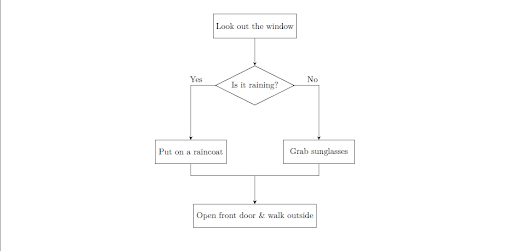
Sequencing defines the order in which instructions, which are processed individually, are performed. A trivial example of sequencing is making cereal; we might opt to put cereal in a bowl first, and then milk. The distinguishing factor between algorithms and sequencing is that sequencing does not necessarily need to have an end goal. That is, doing a backflip then painting a house blue is an example of sequencing. In general, all algorithms have sequencing, but not all sequencings are algorithms.
Writing Code
Code can be written in any program that allows for text to be typed and displayed. Nevertheless, it is preferable to write code in an integrated development environment (IDE); IDEs provide useful features such as auto-completion, file management, debugging, and real-time error checking that are typically not included in a standard text editor. Table 1.1.2 lists IDEs recommended by the College Board (It is not important to memorize these particular IDEs for the AP exam, but they are extremely useful for learning how to code).
| IDE | Platform | Link |
|---|---|---|
| Apache NetBeans | Client based | https://netbeans.apache.org/ |
| jGRASP | Client based | https://www.jgrasp.org/ |
| The Java Playground | Browser based | https://dev.java/playground/ |
| BlueJ | Client based | https://bluej.org/ |
| DrJava | Client based | https://drjava.sourceforge.net/ |
| Eclipse | Client based | https://eclipseide.org/ |
| Greenfoot | Client based | https://www.greenfoot.org/door |
| IntelliJ IDEA | Client based | https://www.jetbrains.com/idea/ |
| JCreator | Client based | https://www.jcreator.en.softonic.com/ |
| JDoodle | Browser based | https://www.jdoodle.com/ |
Table 1.1.2. College Board-recommended integrated development environments for AP Computer Science A.
Compilation
Computers do not understand human language, but programming languages, including Java, are typically written with English words and mathematical symbols. To remedy this problem, a special program known as a compiler, which contains a plethora of algorithms, is used to compile, or translate, human-readable code into computer-readable code. Human-readable code is commonly referred to as source code, and computer-readable code is known as machine code or binary, which consists of 0’s and 1’s. For the purposes of the AP exam, it is only essential that we know what a compiler does, not how it works.
Programming Errors
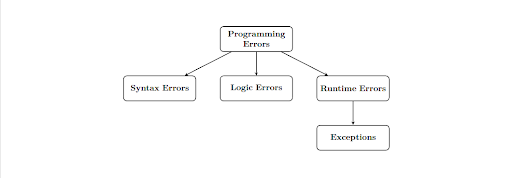
In the event a program produces incorrect, unexpected, or unintended behaviors, we say that the program has an error. Errors are a result of flaws in the source code or design of the program. There are several types of errors, and it is critical that we can differentiate each one, which will be the focus for the remainder of the article.
Syntax Errors
Prior to discussing syntax errors, we must establish a basic understanding of syntax in regard to spoken languages. Syntax refers to the rules that dictate how words and phrases are arranged in order to create a meaningful sentence. For instance, consider the sentence “Sam wore a red shirt.” In English, an adjective always precedes the noun. It would be illogical, and a syntax error, to write “Sam wore a shirt red.” While it is possible to discern the meaning of the latter sentence, compilers are strict, and syntax errors must be fixed before a program can be compiled. Some examples of syntax errors are missing pairs of braces or parentheses, unclosed quotation marks, and capitalizing a word that should be lowercase (or vice versa).
Logic Errors
A logical error is when a program compiles and executes without crashing, but it produces an incorrect or unintended result. Using a real-world analogy, if we baked a cake but accidentally put in one cup of salt instead of sugar, we would still get a cake, but the end product would be inedible. Logical errors will depend on what program we are working on. Consider the raincoat algorithm described above, for example. We would have a logical error if the instructions stated to also wear a raincoat when it is sunny. In contrast, we would have a logical error in a calculator program if pressing the addition button subtracted the numbers instead.
Runtime Errors & Exceptions
A runtime error occurs when our program is successfully compiled and runs but terminates abruptly before completion of the entire program. In this case, we frequently say the program has crashed. Runtime errors typically occur because a program attempts to execute an operation that is mathematically impossible, or the operation violates system constraints. In Java, there is a category of runtime errors called exceptions*. We will learn more about exceptions in future articles, but a trivial example of an exception is an ArithmeticException, which occurs when dividing by zero because division by zero is mathematically impossible. Since exceptions are a type of runtime errors, the program will terminate unexpectedly, and code execution will stop.
* We are not concerned with other types of runtime errors that are not exceptions