
Introduction
Welcome to the FiveHive article for topic 2.6 of AP CSA!
In this article, we will cover the learning objectives of 2.6 as shown in the AP® Computer Science A Course and Exam Description 2025
- 2.6.A - Compare equivalent Boolean expressions.
- 2.6.B - Develop code to compare object references using Boolean expressions and determine the result of these expressions. → yeah quite a mouthful…
In this article, we’ll learn about DeMorgan’s law and the art of identifying equivalent boolean expressions using our good friend truth tables.
And you know how in 2.2 we learned how and why “==”* only works on primitive types and NOT on object/reference types? In this article, we’re going to learn how to PROPERLY compare two objects/reference types to determine equivalence using the equals object method, and how we are able to use “==” and “!=” for objects/reference types..
*also “!=”
Anyways, let’s get to it!
Equivalent Boolean Expressions
No need for a long-drawn explanation: two boolean expressions are said to be equivalent if in all input instances, they evaluate both to the same boolean value.
With that, you might be thinking: “to do that, can’t we just input all the cases into both boolean expressions and see if they yield the same value in said cases?” Well my friend, that’s what we’re going to do!
However, without proper diligence, it’s easy to get lost in the weeds of all your input cases. So, we use what’s called a truth table to organize our proof! And what better way to learn than to see them in action?
Let’s see if these two boolean expressions are equivalent. Let A and B be two distinct boolean values (in this and all the following examples/problems):
Now, let’s set up the table:
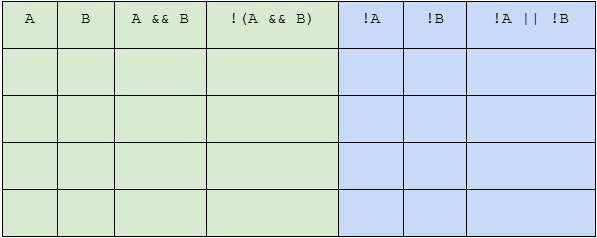
Green is for our first expression, and blue is for our second. In each column for each expression, we start with the smallest part of the expression and work our way up to the full thing.
For green, we start with the primitive boolean values of A and B, then move on to the second part of the expression being A && B, and finally we have a column for the final expression of
For blue, we start with the opposites of the primitive boolean values of A and B (not A and not B), and then we put them together for our final expression !A || !B.
Let’s start off with our input cases for both green and blue:
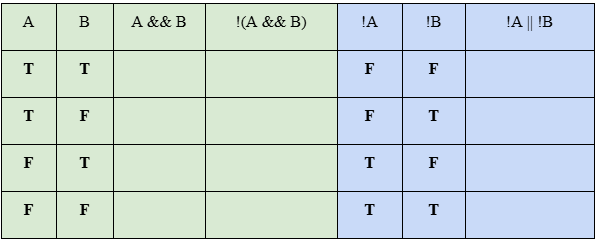
*If you couldn’t already tell, T is true and F is false
Now let’s do the third and fourth column for green. You should already know how to evaluate compound boolean expressions, and if not you can brush up on that by reading article 2.5.
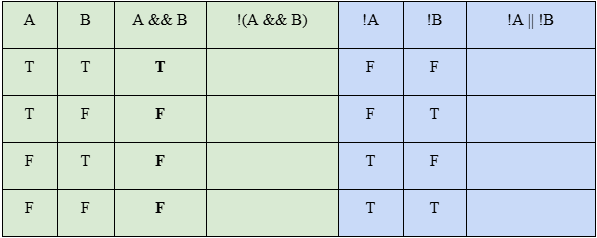
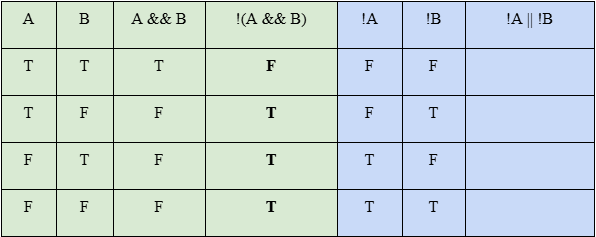
Finally, let’s do the last blue column, and see if the resulting boolean values for each case are the same!
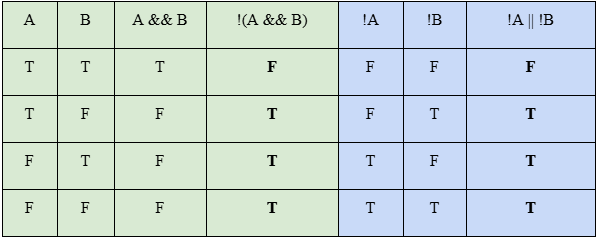
As you can see, the resulting boolean values are the same in each case, meaning that !(A && B) and !A || !B are equivalent boolean expressions!
Try one on your own!
Quick Question (QQ) I: Prove if these two boolean expressions are equivalent using a truth table.
For QQs, you won’t find the answer to this in the answer key at the end of the article, but rather you’ll find out the answer as you continue reading through the article :).
DeMorgan’s Law
Perfect segue! Because actually what I did in my demonstration and what you (hopefully) did in the QQ was prove DeMorgan’s law!
In its basic form, DeMorgan’s law is the following:
!(A && B) is the same as !A || !B
and
!(A || B) is the same as !A && !B
To better understand how it works, think of it like this: in a way, the “!” behind the brackets can be distributed across what’s in the brackets.
Thus, the “!” “multiplies” with every part of what’s in the brackets and turns them into their opposites. So A turns into not A, which is !A. B turns into not B, which is !B. And || turns into its opposite: &&!
So, “!” turns stuff into their opposites.
Comprehension Question (CQ):
Complete the following. Answer is at the end of the article:
- !(=) →
- !(≤) →
- !(≥) →
- !(<) →
- !(>) →
Null and Aliasing
On to the next part of this article: back to comparing objects!
Quick Review from 2.2
Let’s define two Car objects. Assume Car is a class that has been written and implemented in some other file and has a constructor that takes two ints as parameters:
Car ferrariOne = new Car(90, 871);
Car ferrariTwo = new Car(90, 871);
Again as we did in 2.2, imagine for a second that variables in Java are like boxes. Just like variables, boxes store something inside them. In this analogy once again, the box is named after whatever we call our variable.
As you should know, for primitive variables, the box will simply store the value of the variable directly in a place called the primary address.
For object variables, instead of storing what was inputted into the constructor directly in the box that is in the primary address, in the box is simply a metaphorical slip of paper that basically just says “haha get trolled, you’ll find what you put into the constructor in another box that’s at this location [INSERT MEMORY ADDRESS HERE]”.
And for every object you instantiate, the location where the actual constructor-passed values are stored is different. Even if you instantiate two objects of the same class and pass the same values into their respective constructors, their respective boxes at the primary address will store different addresses to a different box.
All caught up? If you need more details, go read article 2.2. Anyway, this chart should make sense now:
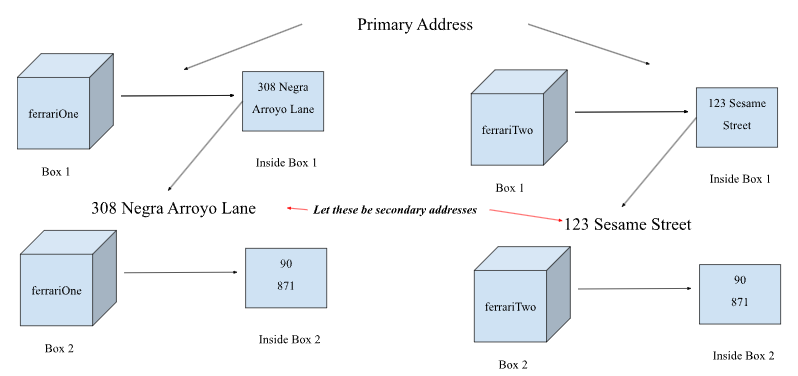
Chart look familiar? Wow, it’s totally like I didn’t just nab it from article 2.2! Anyway, let’s go over aliasing:
Aliasing
Aliasing is simply when you define an object merely as a reference to another object.
Now, instead of ferrariTwo being its own instantiated object, it is now simply defined as ferrariOne. In other words, ferrariOne and ferrariTwo are references to the same object, which is ferrariOne.
Car ferrariOne = new Car(90, 871);
Car ferrariTwo = ferrariOne;
QQ II: What do you think this program will output?
System.out.println(ferrariOne == ferrariTwo);Now, instead of ferrariTwo being its own instantiated object, it is now simply defined as ferrariOne. In other words, ferrariOne and ferrariTwo are references to the same object, which is ferrariOne.
The code views ferrariOne and ferrariTwo as the same objects. ferrariTwo is merely ferrariOne just with a different name, hence why they are aliases of each other!
In memory, it’ll look like this:
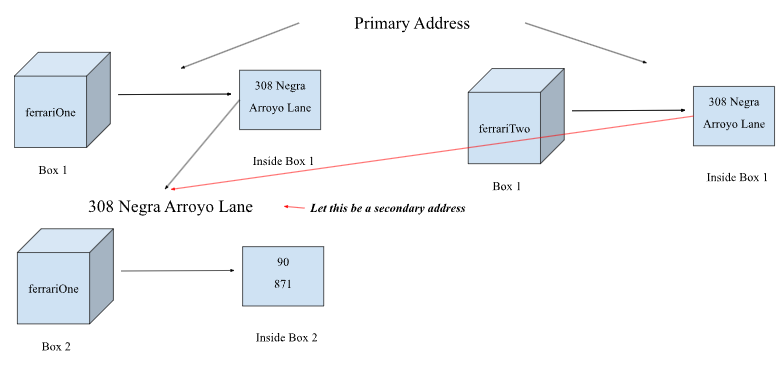
As you can see, both ferrariOne and ferrariTwo point to the same box in the same address. Thus, ferrariOne and ferrariTwo are the same objects just with different names.
With this, because “==” and “!=” compare the values stored in the boxes that are in the primary address, you can use them to see if two objects are aliases of one another.
If you compare two objects using “==” and true is returned, or if you compare two objects using “!=” and false is returned, the two objects are aliases. Otherwise, the two objects are not aliases of one another.
Null
Null is very simple, it’s just a placeholder value. When an object is defined as null, like so:
Car ferrariOne = null;
That simply means that object isn’t defined in memory or in any meaningful way. In other words, it doesn’t reference an object, which is why you can’t use null objects to call object methods.
With that, you can compare objects with null using “==” or “!=” to see if an object is null or not. This can be very useful in your projects to avoid errors, as you can’t use null objects to call object methods.
.equals
equals is a method often defined in classes and is used to compare two objects to see if they are equivalent. What two objects being “equivalent” means is dependent on the criteria determined by the respective equals method.
Often, though, equivalency is established by simply comparing the values of the instance variables in both objects and seeing if they are the same.
EXCLUSION STATEMENT
As stated in the CED, overriding the equals method is NOT expected of YOU INDIVIDUALLY on the AP CS A exam and in this class.
You will definitely see questions involving the equals method on the MCQs, though.
Practice
CQ Answer
- !(=) → !=
- !(≤) → >
- !(≥) → <
- !(<) → ≥
- !(>) → ≤